SharePoint List form show hide fields based on conditional formula
In this blog post I am going to show you that to show or hide fields on a list form based on the valued from other columns using…


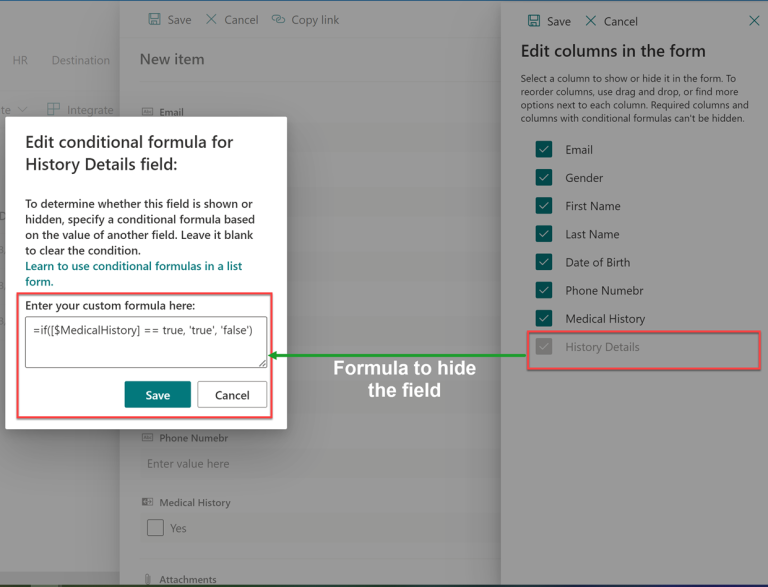
In this blog post I am going to show you that to show or hide fields on a list form based on the valued from other columns using…

If you’re looking for a way to organize and collaborate on data within your organization, Microsoft Lists might be the solution for you. It’s a cloud-based app that…
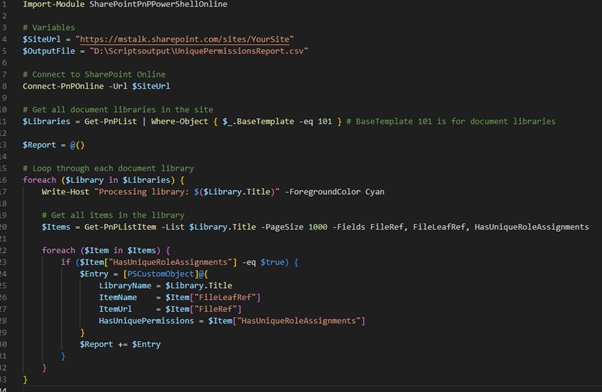
Managing permissions in SharePoint Online can be a challenging task, especially when dealing with items that have unique permissions. To simplify this process, we can use PowerShell to…
SharePoint lists are a powerful tool for managing data and information, but they can be challenging to collaborate on. By using Microsoft Teams, you can collaborate on SharePoint…
If you’re looking for a way to organize and track data within your organization, Microsoft has two tools that may be of interest: Microsoft Lists and SharePoint Lists.…

In Modern SharePoint Lists and Libraries, we can change the layout of the default list form using JSON or by modifying the list forms in Power Apps. JSON…

SharePoint is a popular platform for business collaboration and content management. However, managing large SharePoint environments can be challenging. One common task is to get an inventory of…

Updating SharePoint list item metadata manually can be a time-consuming process, especially when dealing with a large number of items, specially in case of content migration. This script…
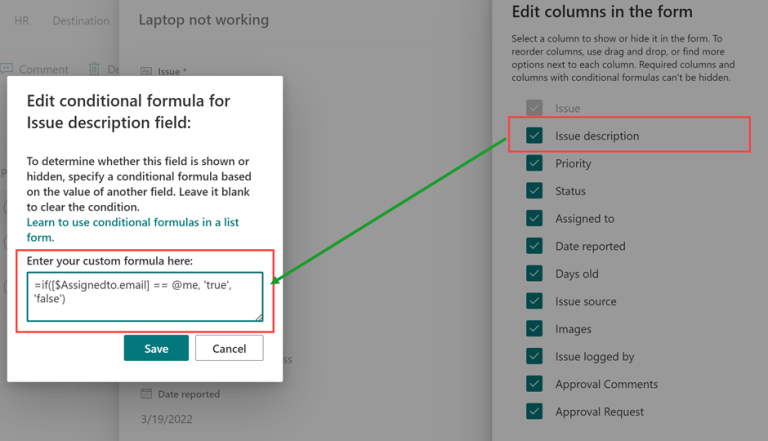
There are requirements to show hide fields or enable/ disable fields based on business requirements for selected values. Today I am going to share how can we can…

In this blog post I will show you how to launch separate Flow based on column value. There are requirements for running separate Flows on the same list…
One short email a week with the new Microsoft 365 guides and PowerShell scripts. Unsubscribe any time.



© 2007–2026 MSTechTalk by Adnan Amin, Microsoft MVP. Free PowerShell scripts on GitHub.