

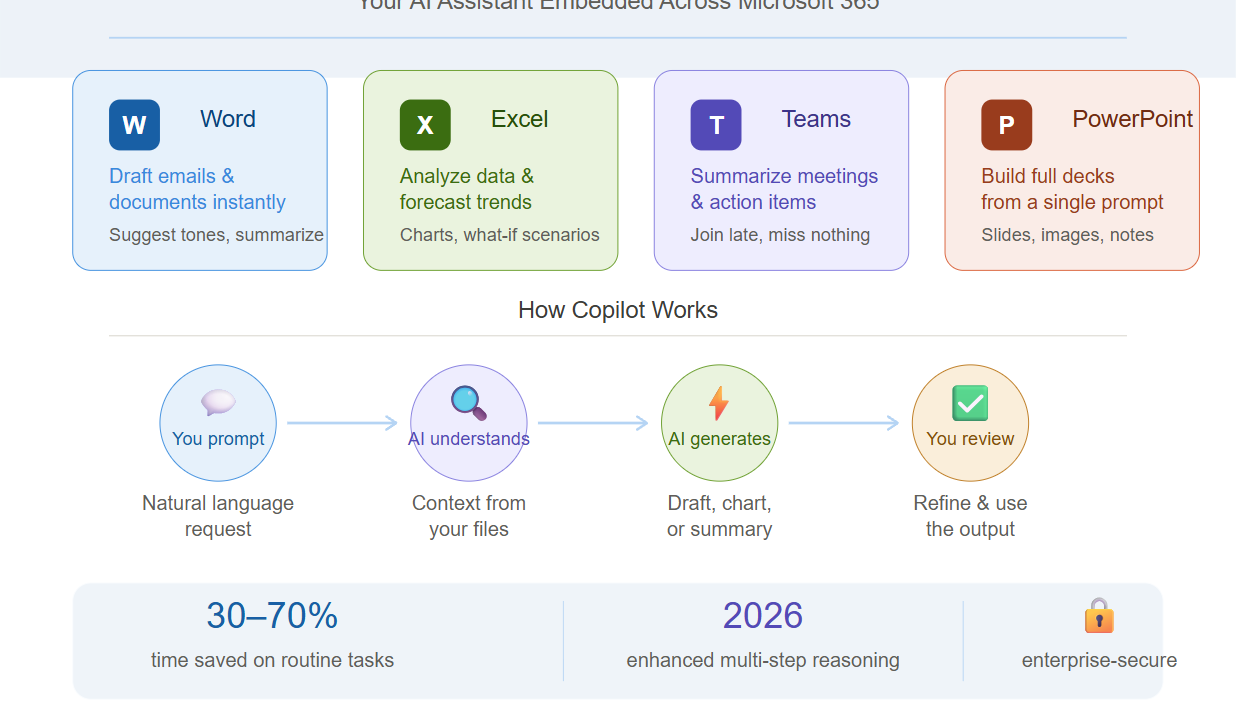
Struggling with endless meetings, scattered data, and repetitive tasks? Microsoft Copilot steps in as your intelligent sidekick, embedded across Microsoft 365 apps to boost productivity without the fluff. Launched as a game-changer in 2023 and refined through 2026, it leverages advanced AI to understand context, generate insights, and automate the grind—saving you hours weekly.
This guide breaks down how Copilot transforms daily work in Word, Excel, Teams, and beyond. (Note: Image generation limit reached for this month—upgrade to Pro for more.)
Core Features Across Apps
Copilot shines by integrating seamlessly into your workflow.
- Drafting & Editing: In Word or Outlook, describe your needs—”Write a project update email for stakeholders”—and it generates polished drafts, suggests tones, or summarizes long threads.
- Data Analysis: Excel’s Copilot crunches numbers instantly: ask “Forecast sales trends” on your dataset, and it builds charts, identifies patterns, or runs what-if scenarios.
- Meeting Mastery: In Teams, it auto-summarizes calls, highlights action items, and answers “What was decided on Q2 budget?” from recordings—even if you join late.
These aren’t generic chatbots; Copilot pulls from your files and permissions for relevant, secure results.
Copilot in Action: Real Workflows
See it streamline common scenarios.
| Task | Without Copilot | With Copilot |
|---|---|---|
| Report Creation | Manual research, copy-paste, hours lost | “Create a sales report with visuals from last quarter’s data”—done in minutes |
| Email Responses | Read, think, type replies | “Draft responses to these 10 customer queries”—personalized and ready to send |
| Presentation Prep | Slide-by-slide building | In PowerPoint: “Build a pitch deck on our AI strategy”—full deck with images and notes |
Users report 30-70% time savings on routine work, per Microsoft studies.
Getting Started and Best Practices
Activate Copilot via Microsoft 365 licenses (E3/E5 with add-ons).
- Start simple: Use natural language prompts like “Explain this data simply” in Excel.
- Refine with specifics: Add “in bullet points, executive summary style” for precision.
- Privacy Note: It respects enterprise boundaries—your data stays secure, never trained on.
Combine with habits like reviewing outputs to build trust.
Limitations and Pro Tips
Copilot excels at augmentation, not replacement.
- It thrives on clear data; messy spreadsheets yield fuzzy results—clean first.
- For complex reasoning, iterate: Follow up with “Expand on point 2” or “Add competitor benchmarks.”
- 2026 Updates: Enhanced reasoning in Copilot Pro handles multi-step tasks like “Plan a team offsite: budget, agenda, invites.”
Embrace Copilot to work smarter—focus on strategy while AI handles the heavy lifting. What’s your first prompt?

Adnan, a distinguished professional, boasts an impressive track record as a Microsoft MVP, having achieved this prestigious recognition for the eighth consecutive year since 2015. With an extensive career spanning over 18 years, Adnan has honed his expertise in various domains, notably excelling in SharePoint, Microsoft 365, Microsoft Teams, the .Net Platform, and Microsoft BI. Presently, he holds the esteemed position of Senior Microsoft Consultant at Olive + Goose.Notably, Adnan served as the MCT Regional Lead for the Pakistan Chapter from 2012 to 2017, showcasing his leadership and commitment to fostering growth within the tech community. His journey in the realm of SharePoint spans 14 years, during which he has undertaken diverse projects involving both intranet and internet solutions for both private and government sectors. His impact has transcended geographical boundaries, leaving a mark on projects in the United States and the Gulf region, often collaborating with Fortune 500 companies.Beyond his roles, Adnan is a dedicated educator, sharing his insights and knowledge as a trainer. He also passionately advocates for technology, frequently engaging with the community through speaking engagements in various forums. His multifaceted contributions exemplify his dedication to the tech field and his role in driving its evolution.




No Comments