

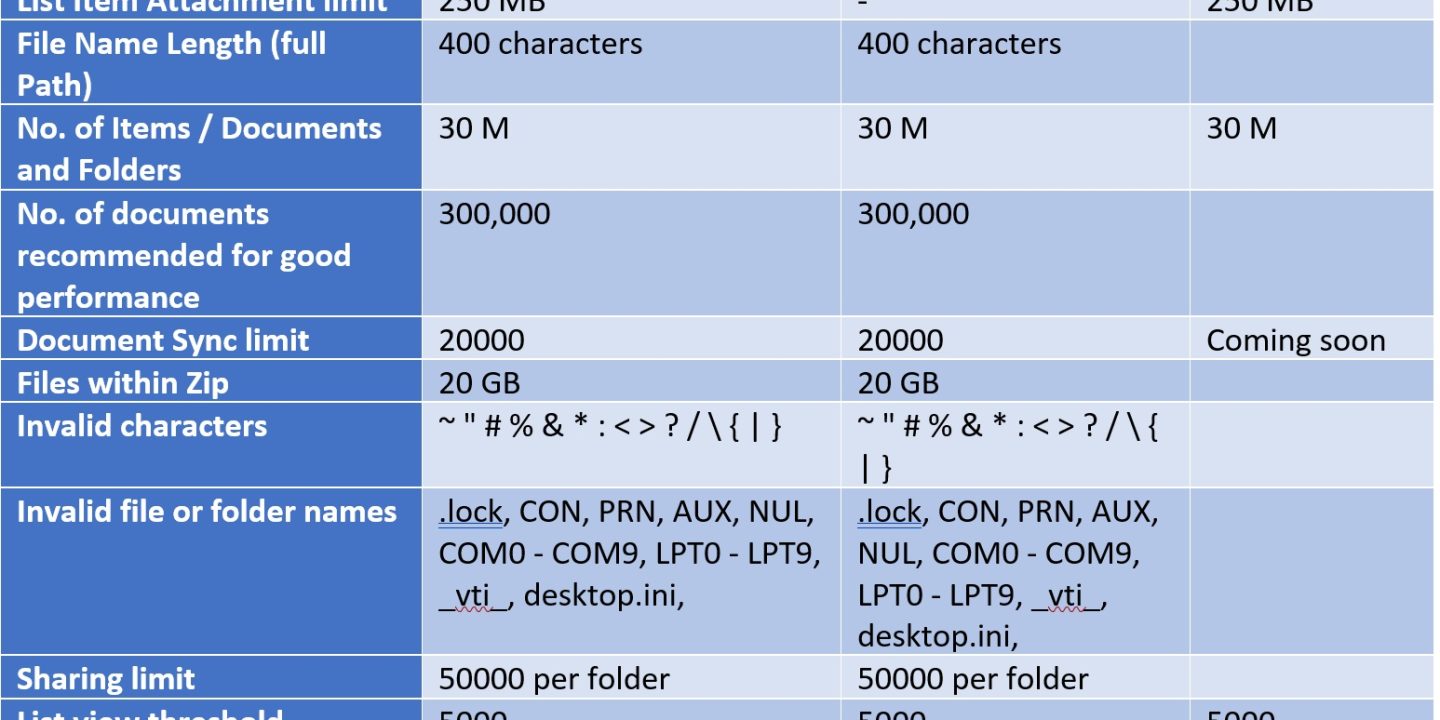
In this blog post I tried to compile a list of boundaries available for SharePoint online, OneDrive and Microsoft lists. Below chart shows the recent boundaries and limits in SharePoint Online and OneDrive for Business
| SharePoint Online | OneDrive for Business | Microsoft Lists | |
| File Size limit | 250 GB | 250 GB | |
| List Item Attachment limit | 250 MB | – | 250 MB |
| File Name Length (full Path) | 400 characters | 400 characters | |
| No. of Items / Documents and Folders | 30 M | 30 M | 30 M |
| No. of documents recommended for good performance | 300,000 | 300,000 | |
| Document Sync limit | 20000 | 20000 | Coming soon |
| Files within Zip | 20 GB | 20 GB | |
| Invalid characters | ~ ” # % & * : < > ? / \ { | } | ~ ” # % & * : < > ? / \ { | } | |
| Invalid file or folder names | .lock, CON, PRN, AUX, NUL, COM0 – COM9, LPT0 – LPT9, _vti_, desktop.ini, | .lock, CON, PRN, AUX, NUL, COM0 – COM9, LPT0 – LPT9, _vti_, desktop.ini, | |
| Sharing limit | 50000 per folder | 50000 per folder | |
| List view threshold | 5000 | 5000 | 5000 |
| No. of Versions per Document /Item | 50,000 Major and 511 Minor versions | 50,000 Major and 511 Minor versions | 50000 Major versions |
If you know any further boundaries, please share with us to update the above listing.
References:

Adnan Amin is a Microsoft MVP for Microsoft 365 (since 2015) and a Senior Microsoft Consultant. He writes practical guides and PowerShell scripts for SharePoint, OneDrive, Teams and Copilot admins.





No Comments