


SharePoint Agents are becoming one of the most interesting additions to the Microsoft 365 ecosystem. Organizations today are dealing with massive amounts of content, scattered documentation, and growing demands for faster access to information. Employees often spend too much time searching for files, policies, procedures, or project details instead of focusing on actual work.
This is where SharePoint Agents can make a real difference.
Built with AI capabilities and integrated with Microsoft 365, SharePoint Agents help users interact with SharePoint content using natural language. Instead of manually browsing folders and libraries, users can simply ask questions and receive relevant answers based on the content they already have access to.
In this blog, we will explore how SharePoint Agents work, their key benefits, common use cases, and why they could become an important part of the modern digital workplace.
What are SharePoint Agents
SharePoint Agents are AI-powered assistants designed to work with SharePoint content and knowledge. These agents understand natural language queries and provide responses based on the files, folders, libraries, and sites connected to them.
Every SharePoint site can have its own agent built on the site’s existing content. Organizations can also create custom agents for specific departments, projects, or business scenarios.
For example:
- HR teams can create an onboarding agent
- Finance teams can build a budgeting support agent
- IT departments can deploy internal support agents
- Project teams can create agents for project documentation and updates
The main advantage is that users receive answers that are directly connected to organizational knowledge instead of searching manually through documents.
Why SharePoint Agents Matter
Many organizations already use SharePoint for document management and collaboration, but finding information quickly is still a challenge for employees.
SharePoint Agents help solve this problem by making content more accessible through conversational AI.
Some of the biggest benefits include:
- Faster access to information
- Reduced dependency on support teams
- Improved employee productivity
- Better knowledge sharing
- More consistent answers across departments
Instead of sending emails or Teams messages for common questions, employees can interact with the agent and receive instant guidance.
Common Use Cases for SharePoint Agents
Employee Onboarding
New employees often struggle to locate policies, forms, training documents, or team resources. A SharePoint Agent can guide them to the correct information without requiring HR or IT intervention every time.
This creates a smoother onboarding experience and reduces repetitive support requests.
Internal Help Desk Support
Organizations receive countless repetitive questions related to password resets, VPN access, leave policies, expense forms, or software requests.
A SharePoint Agent can answer many of these questions immediately by pulling information from existing SharePoint knowledge bases and documentation.
Budget Planning and Financial Processes
Finance teams can use SharePoint Agents to simplify planning activities by helping users retrieve historical budget data, process guidelines, and financial templates.
This reduces manual effort and allows teams to focus more on analysis and strategic planning.
Project Knowledge Management
Project teams often struggle with scattered documentation across different folders and communication channels.
A project-specific SharePoint Agent can help team members quickly locate meeting notes, design documents, project plans, and status reports.
How SharePoint Agents Work
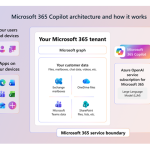
Microsoft 365 Copilot powers the intelligence behind SharePoint Agents. These agents use SharePoint permissions and organizational content to generate responses based on the information users are already authorized to access.
The agents work inside the existing Microsoft 365 security model. This means users can only access content they already have permission to view.
The process generally works like this:
- A user asks a question in natural language
- The agent searches connected SharePoint content
- AI processes the request and identifies relevant information
- The response is generated using the available content and permissions
This approach helps organizations maintain data security while improving accessibility.
Creating SharePoint Agents
Creating a SharePoint Agent is surprisingly simple for business users.
There are multiple ways to create an agent inside SharePoint:
- From the Copilot icon available in the SharePoint ribbon
- Directly from a document library
- Using the New menu from the SharePoint home area
Users can select specific files, folders, or entire sites as the knowledge source for the agent.

This flexibility allows departments to build focused agents for their own business processes without requiring complex development.
Key Features and Capabilities
Built-in Security and Permissions
One of the biggest concerns with AI systems is data security. SharePoint Agents follow the same permission structure already configured in SharePoint Online.
If a user does not have access to a document, the agent will not expose that information.
This helps organizations confidently use AI while maintaining compliance and security standards.
Centralized Agent Management
Site owners can manage agents directly from SharePoint.
They can:
- Approve site agents
- Select default agents
- Feature important agents for users
- Control visibility across sites

This gives organizations better governance and oversight.
Licensing and Availability
Organizations can access SharePoint Agents through Microsoft 365 Copilot licensing. Microsoft is also introducing pay-as-you-go options for organizations using Copilot Studio consumption billing.
This gives businesses flexibility depending on their AI adoption strategy and licensing model.
As Microsoft continues expanding AI capabilities across Microsoft 365, SharePoint Agents are expected to become more widely adopted across departments and industries.
SharePoint Agents represent a major shift in how organizations interact with knowledge and content inside SharePoint Online.
Instead of relying on traditional search and manual navigation, employees can now interact with organizational information in a more natural and intelligent way.
For businesses already using SharePoint Online, these AI-powered agents can improve productivity, reduce repetitive work, and help teams access information faster. As the technology continues to evolve, SharePoint Agents will likely become an important part of the modern workplace experience.
Custom Agents
Microsoft 365
Microsoft 365 Copilot
OneDrive
SharePoint
SharePoint Agent
SharePoint Online

Adnan, a distinguished professional, boasts an impressive track record as a Microsoft MVP, having achieved this prestigious recognition for the eighth consecutive year since 2015. With an extensive career spanning over 18 years, Adnan has honed his expertise in various domains, notably excelling in SharePoint, Microsoft 365, Microsoft Teams, the .Net Platform, and Microsoft BI. Presently, he holds the esteemed position of Senior Microsoft Consultant at Olive + Goose.Notably, Adnan served as the MCT Regional Lead for the Pakistan Chapter from 2012 to 2017, showcasing his leadership and commitment to fostering growth within the tech community. His journey in the realm of SharePoint spans 14 years, during which he has undertaken diverse projects involving both intranet and internet solutions for both private and government sectors. His impact has transcended geographical boundaries, leaving a mark on projects in the United States and the Gulf region, often collaborating with Fortune 500 companies.Beyond his roles, Adnan is a dedicated educator, sharing his insights and knowledge as a trainer. He also passionately advocates for technology, frequently engaging with the community through speaking engagements in various forums. His multifaceted contributions exemplify his dedication to the tech field and his role in driving its evolution.




No Comments