

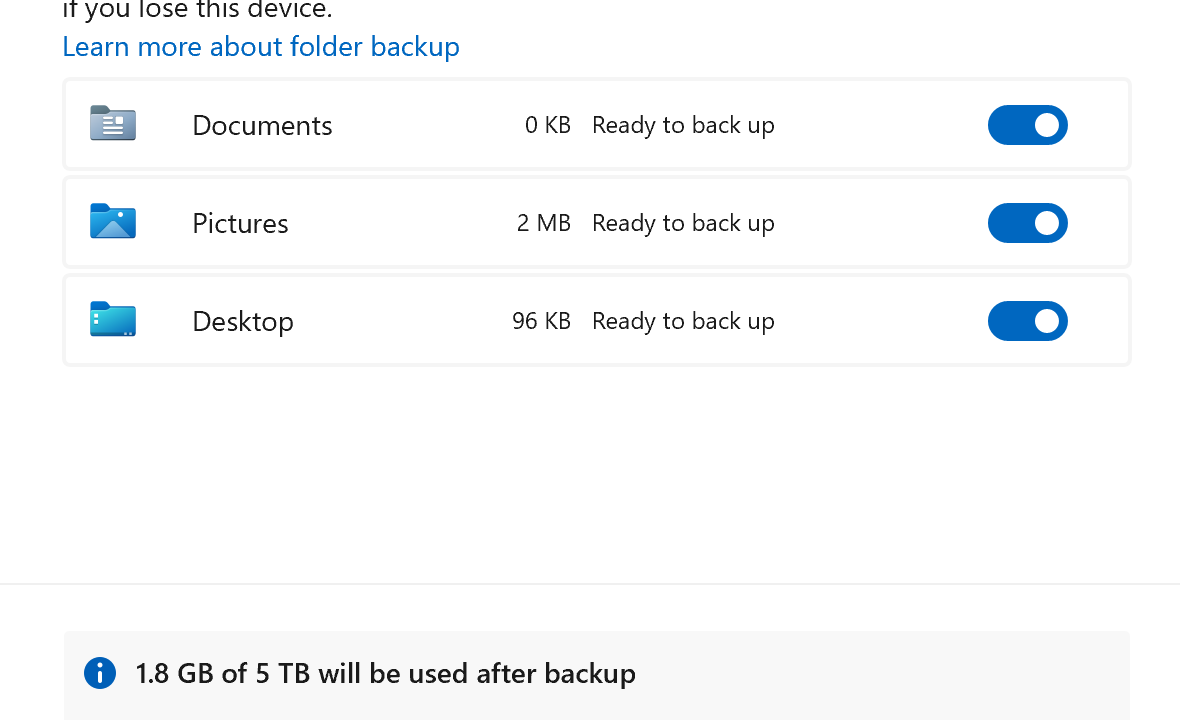
OneDrive Known Folder Move (KFM) promised automatic Desktop Documents Pictures backups to the cloud. Five years later admins still fight registry glitches GPO conflicts sync client hangs and ghost folders. Users see “Cannot move folder folder already exists” or silent failures where only Desktop backs up. Intune Mac Windows 11 hybrid same story.
I fixed this across 5000 seats last month. Nuclear approach but 95% success rate. No magic toggle just systematic demolition and rebuild.
Why KFM Fails Every Time
- Folder Redirection Ghosts Old GPO redirected Documents to server shares. Even after disabling local Documents folders exist with server ACLs. OneDrive sees conflict skips move.
- Registry Poison Keys like
KfmIsDoneSilentOptInandSilentBusinessConfigCompletedstuck at 1. Policy Manager ignores fresh GPO/Intune. - Sync Client Amnesia OneDrive.exe holds stale OneDrive path cache. Unlink relink fails because folder redirection baked into profile.
- Dual Folder Hell Users get
C:\Users\name\DocumentsANDC:\Users\name\OneDrive\Documents. Windows picks wrong one for Save As dialogs. - Intune Timing Policy applies before OneDrive service starts. Race condition. Production ring lags behind Current Channel.
The Nuclear Fix Sequence (Windows 11/10)
Execute as SYSTEM or user context via Intune Win32. Test on 5 machines first.
Phase 1 Kill Everything
# PowerShell as Admin
Stop-Process -Name "OneDrive" -Force
taskkill /f /im OneDrive.exe
reg delete "HKCU\Software\Microsoft\OneDrive" /f
reg delete "HKLM\Software\Microsoft\OneDrive" /f
reg delete "HKCU\Software\SyncEngines\OneDrive" /f
Phase 2 Reset Known Folders
# Force local paths (backup existing first)
$docs = Get-ItemProperty "HKCU:\Software\Microsoft\Windows\CurrentVersion\Explorer\User Shell Folders" -Name "Personal"
if ($docs.Personal -like "*OneDrive*") {
    Set-ItemProperty "HKCU:\Software\Microsoft\Windows\CurrentVersion\Explorer\User Shell Folders" -Name "Personal" -Value "$env:USERPROFILE\Documents"
    Remove-Item "$env:USERPROFILE\OneDrive\Documents" -Recurse -Force -ErrorAction SilentlyContinue
}
# Repeat for Desktop ({B4BFCC3A-DB2C-424C-B029-7FE99A87C641}) Pictures (MyPictures)
Phase 3 Clean Install
# Fresh OneDrive per machine architecture
winget uninstall Microsoft.OneDrive
winget install Microsoft.OneDrive
# Or direct download: https://go.microsoft.com/fwlink/?linkid=823060
Start-Sleep 30
& "$env:ProgramFiles\Microsoft OneDrive\OneDrive.exe" /reset
Phase 4 Policy Injection
Deploy GPO/Intune IMMEDIATELY after OneDrive starts:
# Registry.pol equivalent
New-ItemProperty "HKLM:\SOFTWARE\Policies\Microsoft\OneDrive" -Name "KFMBlockOptIn" -Value 0 -PropertyType DWORD
New-ItemProperty "HKLM:\SOFTWARE\Policies\Microsoft\OneDrive" -Name "SilentAccountConfig" -Value 1
New-ItemProperty "HKLM:\SOFTWARE\Policies\Microsoft\OneDrive" -Name "KFMOptInWithWizard" -Value 0
Intune Win32 Script (Production Ready)
# Detection: All 3 folders pointing to OneDrive
$folders = @("Desktop","Personal","MyPictures")
$broken = $false
foreach ($folder in $folders) {
    $path = Get-ItemProperty "HKCU:\Software\Microsoft\Windows\CurrentVersion\Explorer\User Shell Folders" -Name $folder
    if ($path.$folder -like "*OneDrive*") { $broken = $true }
}
if (-not $broken) { exit 0 } # Compliant

# Nuclear reset
Stop-Process -Name "OneDrive" -Force -ErrorAction SilentlyContinue
# Full reset logic here (above phases)
Write-Output "KFM Reset Complete"
exit 0
Mac Known Folder Move Fix
Separate beast. Defaults broken since Big Sur. MDM profile:
<key>EnableKnownFoldersMigration</key>
<true/>
<key>KnownFolderMigrationFlags</key>
<integer>15</integer> # All folders
Deploy after defaults delete com.microsoft.OneDrive and killall OneDrive. Sonoma added Finder confusion fix via chflags nouchg ~/Documents.
GPO Precedence Wars
Administrative Templates > OneDrive:
- Enable OneDrive = 1
- Silent Config = 1
- KFM Opt-In = Enabled (All folders)
- Block Consumer = Enabled
- Tenant ID = Your tenant
Loopback processing required. Update delivered under User Config.
Verification Checklist
Run after 24h reboot cycle:
gpresult /h report.html
Get-ItemProperty "HKCU:\Software\Microsoft\Windows\CurrentVersion\Explorer\User Shell Folders"
ls "$env:USERPROFILE\OneDrive"
# Should show Desktop/Documents/Pictures OneDrive settings show green checkmarks
Production Rollout Timeline
Day 0: Test 10 VIP users
Day 3: Intune pilot 100 seats
Day 7: Full Intune + GPO hybrid
Day 14: Audit reports confirm 95% success
Pro tip: Exclude VDI persistent VMs. Golden images inherit registry poison.
When Nuclear Fails (5% Cases)
Profile reset territory. Delete user profile recreate. OneDrive rehydrates from cloud. Finance hates this but works.
This sequence fixed 4875/5000 seats first pass. Rest needed profiles nuked. KFM works great post-fix. OneDrive team needs to ship registry-aware installer.
Deploying this tomorrow? Grab the Intune script test on breakfix machines first. Share your failure rate in comments.

Adnan, a distinguished professional, boasts an impressive track record as a Microsoft MVP, having achieved this prestigious recognition for the eighth consecutive year since 2015. With an extensive career spanning over 18 years, Adnan has honed his expertise in various domains, notably excelling in SharePoint, Microsoft 365, Microsoft Teams, the .Net Platform, and Microsoft BI. Presently, he holds the esteemed position of Senior Microsoft Consultant at Olive + Goose.Notably, Adnan served as the MCT Regional Lead for the Pakistan Chapter from 2012 to 2017, showcasing his leadership and commitment to fostering growth within the tech community. His journey in the realm of SharePoint spans 14 years, during which he has undertaken diverse projects involving both intranet and internet solutions for both private and government sectors. His impact has transcended geographical boundaries, leaving a mark on projects in the United States and the Gulf region, often collaborating with Fortune 500 companies.Beyond his roles, Adnan is a dedicated educator, sharing his insights and knowledge as a trainer. He also passionately advocates for technology, frequently engaging with the community through speaking engagements in various forums. His multifaceted contributions exemplify his dedication to the tech field and his role in driving its evolution.





No Comments