

Managing permissions in SharePoint Online can be a challenging task, especially when dealing with items that have unique permissions. To simplify this process, we can use PowerShell to generate a report of all items with unique permissions in the document libraries of a SharePoint Online site. In this blog post, we’ll walk through a PowerShell script that accomplishes this task.
Why Monitor Unique Permissions?
Unique permissions can complicate permission management in SharePoint. While they allow for granular control, they can also lead to inconsistencies and make it harder to maintain a secure and organized environment. Regularly auditing unique permissions helps ensure that your SharePoint site remains manageable and secure.
PowerShell Script to Generate Unique Permissions Report
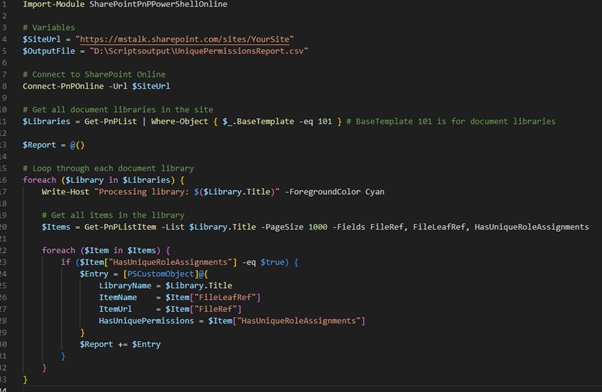
Below is the PowerShell script that generates a report of items with unique permissions in all document libraries of a SharePoint Online site.
Import-Module SharePointPnPPowerShellOnline

# Variables
$SiteUrl = "https://mstalk.sharepoint.com/sites/YourSite"
$OutputFile = "D:\Scriptsoutput\UniquePermissionsReport.csv"

# Connect to SharePoint Online
Connect-PnPOnline -Url $SiteUrl

# Get all document libraries in the site
$Libraries = Get-PnPList | Where-Object { $_.BaseTemplate -eq 101 } # BaseTemplate 101 is for document libraries

$Report = @()

# Loop through each document library
foreach ($Library in $Libraries) {
    Write-Host "Processing library: $($Library.Title)" -ForegroundColor Cyan

    # Get all items in the library
    $Items = Get-PnPListItem -List $Library.Title -PageSize 1000 -Fields FileRef, FileLeafRef, HasUniqueRoleAssignments

    foreach ($Item in $Items) {
        if ($Item["HasUniqueRoleAssignments"] -eq $true) {
            $Entry = [PSCustomObject]@{
                LibraryName = $Library.Title
                ItemName    = $Item["FileLeafRef"]
                ItemUrl     = $Item["FileRef"]
                HasUniquePermissions = $Item["HasUniqueRoleAssignments"]
            }
            $Report += $Entry
        }
    }
}

# Display the report in a grid view
$Report | Out-GridView -Title "Unique Permissions Report"

# Export the report to a CSV file
#$Report | Export-Csv -Path $OutputFile -NoTypeInformation -Encoding UTF8

Write-Host "Unique permissions report generated successfully"
This PowerShell script is a powerful tool for SharePoint administrators to audit and manage unique permissions in document libraries. By regularly running this script, you can maintain better control over your SharePoint Online environment and ensure that permissions are applied consistently.
Feel free to customize the script to suit your specific needs, and don’t forget to share your feedback or improvements in the comments below!

Adnan, a distinguished professional, boasts an impressive track record as a Microsoft MVP, having achieved this prestigious recognition for the eighth consecutive year since 2015. With an extensive career spanning over 18 years, Adnan has honed his expertise in various domains, notably excelling in SharePoint, Microsoft 365, Microsoft Teams, the .Net Platform, and Microsoft BI. Presently, he holds the esteemed position of Senior Microsoft Consultant at Olive + Goose.Notably, Adnan served as the MCT Regional Lead for the Pakistan Chapter from 2012 to 2017, showcasing his leadership and commitment to fostering growth within the tech community. His journey in the realm of SharePoint spans 14 years, during which he has undertaken diverse projects involving both intranet and internet solutions for both private and government sectors. His impact has transcended geographical boundaries, leaving a mark on projects in the United States and the Gulf region, often collaborating with Fortune 500 companies.Beyond his roles, Adnan is a dedicated educator, sharing his insights and knowledge as a trainer. He also passionately advocates for technology, frequently engaging with the community through speaking engagements in various forums. His multifaceted contributions exemplify his dedication to the tech field and his role in driving its evolution.



No Comments