

Managing SharePoint content becomes difficult over time. Most organizations have thousands of files stored across multiple sites and document libraries. Some files are outdated, many are duplicated, and in many cases metadata is either incomplete or missing completely.
This creates problems not only for users searching for information but also for Microsoft 365 Copilot. AI tools depend heavily on properly organized content. If the data inside SharePoint is messy, Copilot responses also become less reliable.
Microsoft introduced SharePoint Knowledge Agent in public preview during September 2025 to help solve this issue. Instead of acting like another chatbot, Knowledge Agent focuses on improving the structure and quality of SharePoint content in the background.
After reviewing and testing the feature, I see it more as an intelligent content management layer for SharePoint rather than a traditional AI assistant.
Why This Feature Matters
Many organizations are investing in Microsoft 365 Copilot but very few are preparing their SharePoint environment properly before deployment.
This is something I have seen repeatedly in real projects. Companies expect AI to deliver accurate answers instantly while their SharePoint environment still contains:
- old policies
- duplicate documents
- untagged files
- outdated pages
- inconsistent naming conventions
Knowledge Agent helps identify these issues and recommends improvements automatically. The biggest benefit is not just better organization. It actually improves the quality of Copilot responses because the source content becomes cleaner and easier to understand.
In one test scenario, document discovery became much faster after metadata improvements were applied to large document libraries.
How Knowledge Agent Is Different
Compared to Microsoft 365 Copilot
Microsoft 365 Copilot responds when users ask questions. Knowledge Agent works before that stage.
It focuses on improving SharePoint data by analyzing libraries, identifying gaps, suggesting metadata, and helping organize content more effectively.
You can think of it this way.
- Copilot helps users find information.
- Knowledge Agent helps prepare the information properly first.
- Both features work much better together.
Compared to SharePoint Agents
Traditional SharePoint Agents usually focus on specific business processes such as approvals, notifications, or workflow actions.
Knowledge Agent is focused more on content governance and library management across SharePoint sites.
Instead of handling a single process, it continuously reviews how information is stored and accessed.
Features That Stood Out During Testing
One useful capability is automatic metadata recommendations.
For example, in a contract library, the agent suggested adding fields such as:
- client name
- contract expiry date
- department
- renewal status
It also recommended creating filtered views for contracts expiring within the next quarter.
In another HR related scenario, the agent identified onboarding forms and extracted employee information automatically from uploaded documents.
This can save significant manual effort for teams managing large document repositories.
Technical Deep Dive Configuration
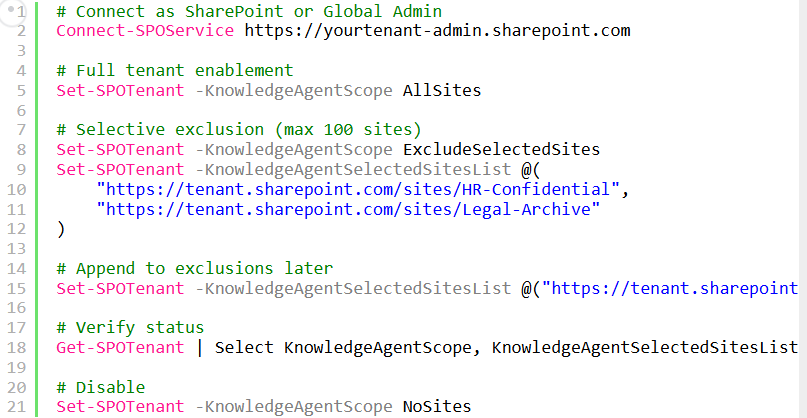
Knowledge Agent currently requires SharePoint Online Management Shell configuration.
# Connect as SharePoint or Global Admin
Connect-SPOService https://yourtenant-admin.sharepoint.com

# Full tenant enablement
Set-SPOTenant -KnowledgeAgentScope AllSites

# Selective exclusion (max 100 sites)
Set-SPOTenant -KnowledgeAgentScope ExcludeSelectedSites
Set-SPOTenant -KnowledgeAgentSelectedSitesList @(
    "https://tenant.sharepoint.com/sites/HR-Confidential",
    "https://tenant.sharepoint.com/sites/Legal-Archive"
)

# Append to exclusions later
Set-SPOTenant -KnowledgeAgentSelectedSitesList @("https://tenant.sharepoint.com/sites/Finance-Old") -KnowledgeAgentSelectedSitesListOperation Append

# Verify status
Get-SPOTenant | Select KnowledgeAgentScope, KnowledgeAgentSelectedSitesList

# Disable
Set-SPOTenant -KnowledgeAgentScope NoSites
From a governance perspective, I strongly recommend starting with pilot sites before enabling it tenant-wide.
Governance Security Monitoring
One important aspect is that Knowledge Agent respects existing SharePoint permissions.
Users only see content they already have access to, and administrative actions remain visible through Microsoft Purview audit logs.
For organizations concerned about compliance, this is critical because the feature works within the existing Microsoft 365 security and governance framework.
At the time of writing, there are still some preview limitations, including:
- Limited exclusion support
- No GCC High availability yet
- Some configuration still requiring PowerShell
However, Microsoft is expected to expand capabilities further as the feature approaches general availability.
Rollout Strategy That Works
Based on my experience with SharePoint and Microsoft 365 adoption projects, I would recommend the following rollout strategy:
Phase 1 – Pilot: Start with a single non-sensitive SharePoint site that has messy or inconsistent content.
Phase 2 – Department Testing: Expand to a few active team sites and gather feedback from content owners.
Phase 3 – Governance Review: Review metadata suggestions, audit logs, and permission handling with compliance teams.
Phase 4 – Wider Deployment: Roll out more broadly while excluding highly sensitive or archival sites initially.
The biggest improvements usually come from older environments with years of unmanaged content.
I think the real value of Knowledge Agent is not the AI experience itself. The real value is improving SharePoint content quality before users interact with Copilot.
Many organizations underestimate how important clean metadata and properly managed libraries are for AI readiness.
From what I have seen so far, this feature can help organizations improve both content governance and overall Microsoft 365 search experiences without requiring major manual cleanup projects.

Adnan, a distinguished professional, boasts an impressive track record as a Microsoft MVP, having achieved this prestigious recognition for the eighth consecutive year since 2015. With an extensive career spanning over 18 years, Adnan has honed his expertise in various domains, notably excelling in SharePoint, Microsoft 365, Microsoft Teams, the .Net Platform, and Microsoft BI. Presently, he holds the esteemed position of Senior Microsoft Consultant at Olive + Goose.Notably, Adnan served as the MCT Regional Lead for the Pakistan Chapter from 2012 to 2017, showcasing his leadership and commitment to fostering growth within the tech community. His journey in the realm of SharePoint spans 14 years, during which he has undertaken diverse projects involving both intranet and internet solutions for both private and government sectors. His impact has transcended geographical boundaries, leaving a mark on projects in the United States and the Gulf region, often collaborating with Fortune 500 companies.Beyond his roles, Adnan is a dedicated educator, sharing his insights and knowledge as a trainer. He also passionately advocates for technology, frequently engaging with the community through speaking engagements in various forums. His multifaceted contributions exemplify his dedication to the tech field and his role in driving its evolution.





No Comments